
AWinware Pdf Watermarking Utility1.0.1.3 - Download
You'll be able to download in few seconds.
Publisher Description
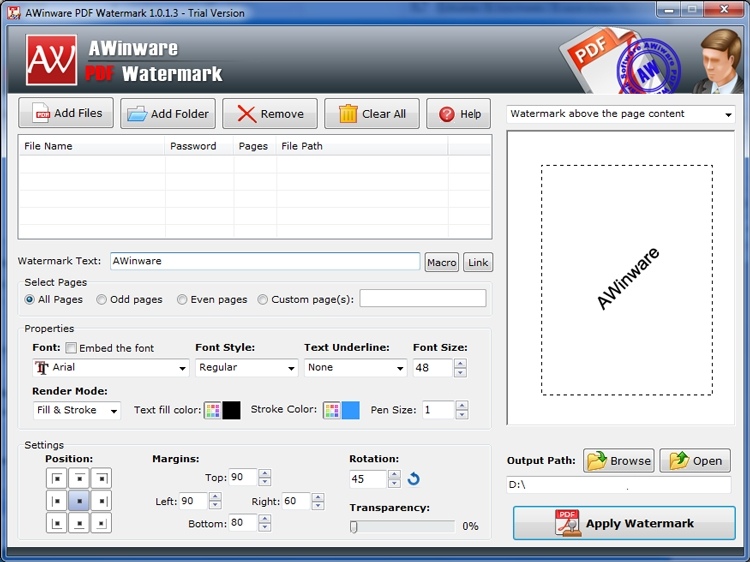
Mark your personal and proprietary document with a copyright, trademark or registered text logo using AWinware Pdf Watermark Software. Tool creates quality watermark on all the pages or on specified pages quickly and efficiently. Tool stamps watermark on each selected pdf file in bulk mode. Use macros to add page numbering on all pages, write file name on each pdf and local date time dynamically etc. stamp current date time, copyright, trademark, registered, file author, subject, keywords and title text extracted from document. Our pdf watermark utility is Windows 8 ready, supports secure and password protected pdf files. Add watermark with transparency, shadow and rotation effect. Position can be selected to top, bottom, left, right or at any corner. This standalone desktop solution lets user to adjust the margins on page sides to create watermark. Draw watermark text of selected color, position, font name and font size. Tool supports standard font as well as true type font, option to embed the font into pdf file. Program is standalone and graphical user interface application, does not require Adobe expensive applications to run. Help file is also provided as attachment with the application to help user in using the program. Tool successfully works on Windows XP, Vista, 7 and Windows 8 operating system.
About AWinware Pdf Watermarking Utility
This Office Suites & Tools program is available in English. It was last updated on 29 September, 2026. AWinware Pdf Watermarking Utility is compatible with the following operating systems: Windows.
The company that develops AWinware Pdf Watermarking Utility is pdfmonster.net. The latest version released by its developer is 1.0.1.3.
The download we have available for AWinware Pdf Watermarking Utility has a file size of 2.1 MB. Just click the green Download button above to start the downloading process. The program is listed on our website since 2014-12-22 and was downloaded 0 times. We have already checked if the download link is safe, however for your own protection we recommend that you scan the downloaded software with your antivirus. Your antivirus may detect the AWinware Pdf Watermarking Utility as malware if the download link is broken.
How to install AWinware Pdf Watermarking Utility on your Windows device:
- Click on the Download button on our website. This will start the download from the website of the developer.
- Once the AWinware Pdf Watermarking Utility is downloaded click on it to start the setup process (assuming you are on a desktop computer).
- When the installation is finished you should be able to see and run the program.
Program Details
System requirements
Download information
Pricing
Version History
version 1.0.1.3
posted on 2014-12-22
Draw page numbers.
version 1.0.1.3
posted on 2013-02-12
Added use of macro.
Disclaimer
External Download
We do not host AWinware Pdf Watermarking Utility on our servers. We did not scan it for viruses, adware, spyware or other type of malware. This app is hosted by the software publisher and passed their terms and conditions to be listed there. We recommend caution when installing it.
The external download link for AWinware Pdf Watermarking Utility is provided to you by apps112.com without any warranties, representations or guarantees of any kind, so access it at your own risk.
If you have questions regarding this particular app contact the publisher directly. For questions about the functionalities of apps112.com contact us.
